How to Build Topical Authority for AI Search: A Practical Guide
Have you ever published a good article, waited for traffic, and then wondered why Google still seems to ignore your website?
You may have a useful article. You may have chosen a relevant keyword. You may even have optimized the title, headings, images, and meta description.
But there is another question worth asking:
Does your website actually demonstrate depth on the subject?
This is where topical authority becomes interesting.
Building topical authority isn’t about publishing 100 random blog posts or repeating the same keyword across dozens of pages. It’s about creating a useful collection of content that covers a subject from different angles and connects those pieces together.
Think of it like building a library.
One book about SEO can be useful.
But a library containing books about keyword research, technical SEO, content strategy, internal linking, search intent, website structure, and measurement gives visitors a much deeper resource.
Your website can work in a similar way.
And as search experiences increasingly use AI to understand and connect information, having a clear, well-organized body of content around a subject can become an important part of building a strong website.
1. What Is Topical Authority?
Topical authority simply means that your website has useful, relevant and connected information covering a particular subject.
It doesn’t mean Google gives your website an official “authority score.”
And it certainly doesn’t mean you can publish 50 articles about one keyword and suddenly become an authority.
Instead, think about it from a visitor’s perspective.
Suppose someone visits a website that has one article about WordPress.
The article explains what WordPress is, but that’s it.
Now imagine another website that has useful resources covering:
WordPress website planning
choosing a theme
website speed
mobile usability
security
plugins
WordPress SEO
website maintenance
common WordPress problems
conversion optimization
Which website appears to understand the subject more deeply?
The second website has created a much stronger content ecosystem.
Authority comes from coverage, not repetition
This distinction is important.
A website doesn’t become authoritative simply because it says:
WordPress website
WordPress website
WordPress website
WordPress website
throughout every page.
That’s repetition.
Instead, it should answer the different questions people have about WordPress.
That’s coverage.
And coverage gives you an opportunity to create genuinely useful content.
For example, if you’re building a website around AI-powered search, one article might explain the basics, another could explain how to check visibility, another could discuss content optimization, and another could explain how to improve the overall website structure.
Your existing article on how to make your website AI-friendly in 2026 is a good example of one piece within that larger subject.
The important part is what comes next:
What other questions does the reader have after finishing that article?
Those questions can become your next content opportunities.
Don’t confuse topical authority with publishing volume
You don’t need to publish every day.
In fact, publishing a large number of weak articles can create more problems than it solves.
Google’s current documentation continues to direct site owners toward Search Essentials, useful content and sound SEO practices rather than a magic publishing formula.
One genuinely useful article can be more valuable to your website than five pages written only to target slightly different versions of the same keyword.
So instead of asking:
“How many articles should I publish this month?”
try asking:
“What important question about my main subject haven’t I answered yet?”
That’s a much better starting point.
2. Why One Article Is Not Enough
Imagine you own a website that provides SEO services.
You publish one excellent article:
“What Is SEO?”
It’s 2,000 words long and explains the basics beautifully.
Will that one article prove that your entire website deeply understands SEO?
Probably not.
A beginner may learn something from it, but they will almost certainly have more questions.
For example:
How does keyword research work?
How should I optimize a service page?
What is technical SEO?
How do internal links work?
How do I measure SEO performance?
Why isn’t my website being indexed?
How should I optimize content?
What happens when search behavior changes?
Each question represents a possible content opportunity.
One article can become a starting point
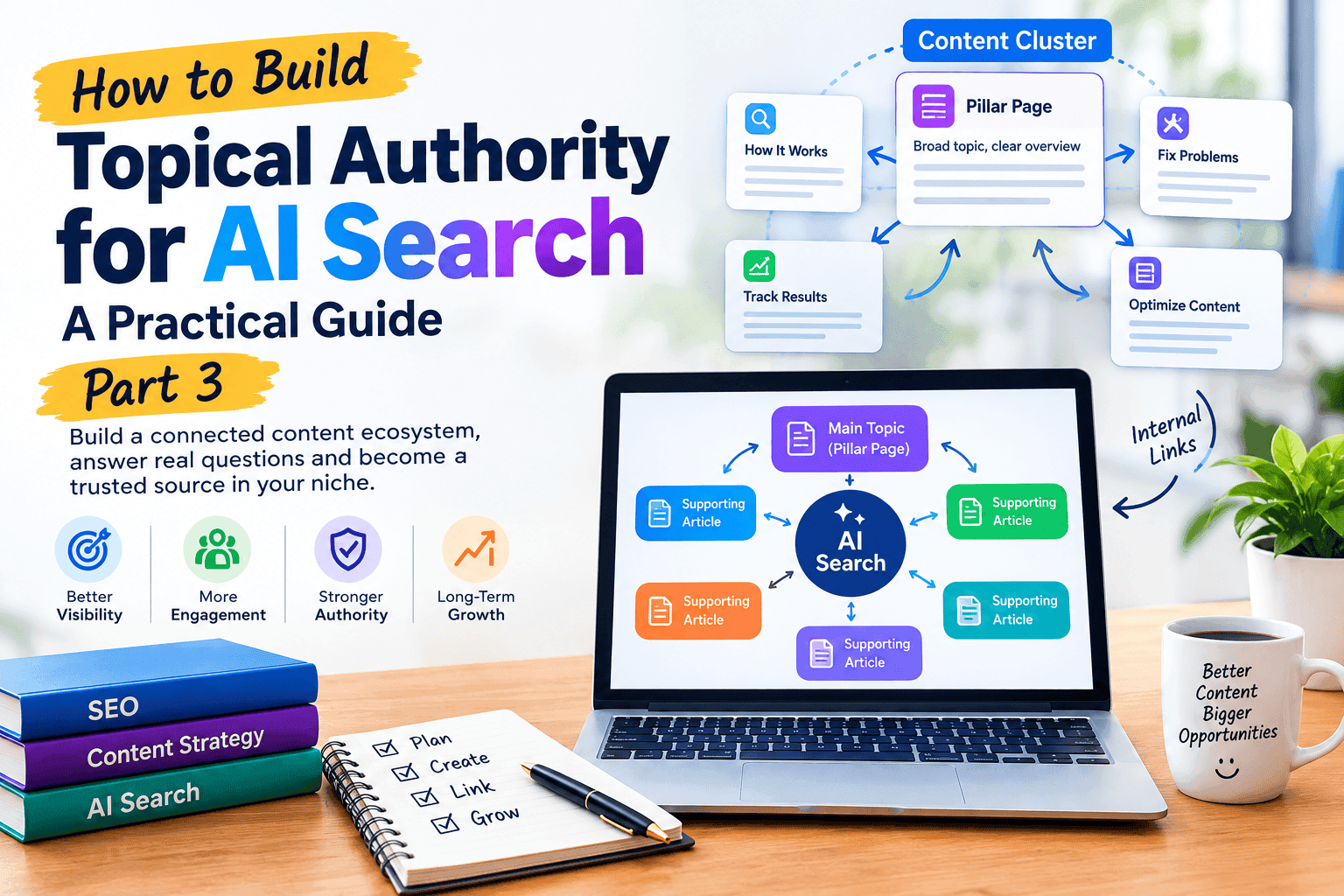
Think of your main article as the center of a wheel.
Around it are supporting pages.
For example:
Main topic: SEO
↓
Supporting topics:
Keyword Research
Technical SEO
Content Strategy
Internal Linking
Local SEO
On-Page SEO
SEO Analytics
Link Building
Now your website isn’t relying on one page.
It has a network of useful resources.
The same approach works for your AI-search content.
You’ve already created articles such as why AI search isn’t showing your website and how to check if your website appears in AI search results.
Those articles don’t need to compete with each other.
They can work together.
One explains a problem.
Another shows how to investigate it.
Another can explain how to improve the underlying content.
That’s the beginning of a content cluster.
Think about the reader’s next question
This is one of the easiest ways to plan your next article.
Imagine a visitor finishes reading:
“How to Check If Your Website Appears in AI Search Results.”
What might they ask next?
Perhaps:
“Okay, I checked my website. What should I do if it isn’t appearing?”
That’s a new content opportunity.
Then perhaps:
“How do I improve the chances of my content being referenced?”
Another opportunity.
Then:
“How do I track whether things are improving?”
Another.
You are no longer guessing random blog topics.
You’re following the reader’s journey.
3. Find Your Main Topic and Subtopics
Before creating dozens of articles, decide what your website actually wants to be known for.
This sounds obvious, but many websites skip this step.
They publish:
one article about SEO
one about WordPress
one about AI
one about social media
one about email marketing
one about graphic design
one about something completely unrelated
After a while, the blog becomes a collection of disconnected pages.
There’s nothing wrong with covering multiple subjects if the business genuinely serves those areas.
But if you’re trying to build authority around a specific subject, you need a clearer structure.
Start with one broad topic
Let’s use:
AI-powered search
as an example.
Now break it into meaningful subtopics.
Subtopic 1: Understanding the subject
What is AI-powered search?
How does it differ from traditional search?
How do AI-generated answers use web information?
Subtopic 2: Content
How should articles be written?
How can you answer questions clearly?
How can you avoid unnecessary repetition?
How should existing content be improved?
Subtopic 3: Website structure
How should related pages be connected?
How should important pages be organized?
How can users navigate between related resources?
Subtopic 4: Measurement
How can website visibility be monitored?
How can you identify content gaps?
How can you compare performance over time?
Now you have a map.
And notice something important:
You haven’t chosen keywords yet.
That’s intentional.
First understand the subject.
Then identify the questions people ask.
Then research the search terms associated with those questions.
This usually produces a much more useful content plan than starting with a giant keyword list.
4. Build a Content Map Before Writing
Once you have your main topic and subtopics, create a simple content map.
You don’t need complicated SEO software.
A spreadsheet is enough.
For example:
| Main Topic | Supporting Article | Purpose |
|---|---|---|
| AI-powered search | How to make a website AI-friendly | Practical guide |
| AI-powered search | Why AI search isn’t showing your website | Problem solving |
| AI-powered search | How to check website visibility | How-to |
| AI-powered search | How to track visibility | Measurement |
| AI-powered search | How to get cited by AI search engines | Advanced strategy |
| AI-powered search | How to optimize content naturally | Content strategy |
Now you can see how the pages relate to one another.
That’s much better than having 20 article titles sitting in a notebook with no connection between them.
Your content map should answer three questions
1. What is the main subject?
This is your central theme.
2. What questions do people have about it?
These become supporting articles.
3. How should those articles connect?
This is where internal linking becomes important.
Google’s documentation explains that site structure and links help users navigate between pages, while descriptive anchor text can make links easier to understand.
So don’t think of internal links as something you add at the end just for SEO.
Think of them while planning the content.
Example
Suppose you’re writing an article about improving content for AI-powered search.
You mention that a website should first make sure its pages are properly structured and understandable.
That’s a natural point to link to your existing guide on how to optimize your website for AI-powered search.
Later, when discussing whether a website is actually appearing in AI-generated answers, you can point readers toward how to track AI search visibility.
Now the links aren’t random.
They form a path.
Article A → Article B → Article C
And the visitor can continue learning without having to return to Google after every question.
A Simple Way to Think About Topical Authority
Here’s the easiest mental model:
One article = one answer.
A content cluster = many connected answers.
A well-organized website = a useful resource.
That’s the direction you should aim for.
Don’t publish another article simply because a keyword tool says there is search volume.
First ask:
Does this topic belong to the subject I want my website to become known for?
If yes, then ask:
Does this article provide something genuinely useful that my existing pages don’t already provide?
If the answer is also yes, you probably have a worthwhile content idea.
In Part 1, we looked at the basic idea behind topical authority and why one article rarely covers everything a reader needs.
Now let’s get practical.
You’ve chosen your main subject. You’ve listed the questions people ask. You’ve created a content map.
The next challenge is:
How do you turn that map into a website where the articles actually support one another?
That’s where pillar content, supporting articles and internal links come together.
5. Create Pillar and Supporting Content
A simple content cluster usually has two main layers:
Pillar content and supporting content.
Think of the pillar page as the main guide.
It covers a broad subject without trying to explain every tiny detail.
Supporting articles then go deeper into specific questions.
Here’s a simple example
Suppose your main topic is:
AI-powered search
Your pillar article could be:
The Complete Guide to AI-Powered Search
Then supporting articles might cover:
How AI-powered search works
How to prepare your website
How to check whether your website appears
How to track visibility
How to improve content
How to identify content gaps
How to build useful topic clusters
The pillar page introduces these areas.
The supporting pages explain them in much greater detail.
Don’t make your pillar page enormous just for the sake of length
This is where many content strategies go wrong.
Someone hears “pillar content” and thinks:
“I need a 10,000-word article.”
Not necessarily.
A good pillar page should provide a useful overview and direct readers toward deeper resources.
For example, your article about how to make your website AI-friendly in 2026 can act as an important broader resource within your existing cluster.
A reader may understand the general process there and then move to a more specific article when they have a particular problem.
That’s the whole point.
The pillar gives direction. The supporting article gives depth.
6. Connect Related Articles With Internal Links
This is where a content cluster starts becoming a real system instead of a collection of blog posts.
Imagine you have ten excellent articles.
If none of them are connected, a visitor may read one and leave.
Now imagine those same ten articles contain useful, relevant links to one another.
A visitor reads one article and thinks:
“That’s exactly what I’m struggling with.”
They click.
Then the next article answers another question.
They click again.
Now your website is helping them solve a problem step by step.
Internal links should make sense
Let’s say you’re explaining why a website isn’t appearing in AI-generated answers.
That’s a natural opportunity to link to your article about why AI search isn’t showing your website.
If you then explain how to check whether the problem actually exists, you can point readers to how to check if your website appears in AI search results.
And if you discuss monitoring changes over time, how to track AI search visibility becomes the natural next step.
Notice the pattern.
The links aren’t there because:
“I need five internal links in this article.”
They’re there because:
“The reader needs more information about this particular point.”
That’s a much better approach.
Use descriptive anchor text
Compare:
Click here to learn more.
with:
Learn how to track AI search visibility over time.
The second one tells the reader what they’re going to find.
Google’s documentation also recommends using descriptive, concise and relevant anchor text so users and search engines can understand the destination of a link. Google Search Central’s link guidance
So instead of writing:
“You can read more here.”
write something that describes the resource:
“Learn how to check whether your website appears in AI search results.”
That’s better for the person reading the page.
7. Cover Questions at Different Stages of the Reader Journey
Not everyone visiting your website is looking for the same thing.
One person may be learning about a subject for the first time.
Another may already understand it and be comparing solutions.
Someone else may be ready to hire a service.
Your content cluster should account for these differences.
Stage 1: Learning
The reader has a basic question.
Examples:
What is AI-powered search?
How does it work?
Why is it changing search?
What does it mean for websites?
At this stage, educational content is useful.
The reader isn’t necessarily ready to buy anything.
They’re trying to understand the subject.
Stage 2: Solving a problem
Now the visitor has a specific issue.
For example:
“My website isn’t appearing in AI-generated answers.”
That’s different from someone asking what AI search is.
They need troubleshooting and practical steps.
That’s where an article such as Why AI Search Isn’t Showing Your Website becomes useful.
Stage 3: Taking action
The reader understands the problem and wants to do something about it.
They may search for:
how to improve website content
how to improve website structure
how to monitor results
how to get professional help
This is where detailed guides and service pages become important.
For a business website, the blog should not exist separately from the services.
The blog can educate the visitor, while relevant service pages give them a next step when they’re ready.
Think of your content as a journey
A visitor might move like this:
Learn → Understand the problem → Explore solutions → Compare options → Take action
Your website should have useful content for each stage.
That doesn’t mean every article should try to sell something.
In fact, constantly pushing a service can make educational content feel like advertising.
Let the article do its job.
When a service genuinely solves the problem being discussed, give the reader a clear path to it.
8. Avoid Content Cannibalization and Topic Repetition
Now we come to one of the biggest problems with large content clusters.
You can accidentally create five articles that are basically the same article.
For example:
How to Improve AI Search Visibility
Ways to Improve AI Search Visibility
How to Increase AI Search Visibility
Tips for Better AI Search Visibility
How to Get More AI Search Visibility
Different titles.
Almost identical content.
That’s not a strong content strategy.
It’s repetition.
Give every article a distinct job
Before creating a new article, write one sentence:
“This article exists to help the reader ______.”
For example:
Article A:
This article explains why a website may not appear in AI-generated answers.
Article B:
This article shows how to check whether the website appears.
Article C:
This article explains how to monitor changes over time.
Article D:
This article explains how to improve content so it better answers user questions.
Now the articles have different purposes.
They can link to each other without competing to say exactly the same thing.
Your existing content already demonstrates this
You’ve created several articles around AI-powered search.
For example:
These topics overlap slightly, but they can serve different purposes.
Checking is different from tracking.
Getting cited is different from optimizing the website.
That’s the distinction you want to maintain when expanding the cluster.
How to Decide Whether You Need a New Article
Before publishing another post, ask yourself five questions:
1. Is this genuinely a different question?
If the answer is no, you may already have the article you need.
2. Does the existing article answer it properly?
If yes, improve the existing article instead of creating another one.
3. Can the new article go significantly deeper?
If yes, a separate article may make sense.
4. Can the two articles link naturally to each other?
If yes, that’s a good sign.
5. Would a reader understand why both articles exist?
This is perhaps the most important question.
If the answer is no, stop and rethink the topic.
A Simple Internal Linking Map
Let’s turn this into something practical.
Imagine your cluster contains these pages:
Pillar:
How to Make Your Website AI-Friendly
↓
Supporting article:
Why AI Search Isn’t Showing Your Website
↓
Supporting article:
How to Check Your Website’s AI Search Visibility
↓
Supporting article:
How to Track AI Search Visibility
↓
Supporting article:
How to Get Your Website Cited
↓
Supporting article:
How to Optimize Content Naturally
Each supporting article can link back to the broader guide when relevant.
The supporting articles can also link sideways to one another when the reader would benefit from continuing to another topic.
This creates a connected structure rather than a collection of isolated URLs.
And because your website already has many of these pages, you don’t necessarily need to publish dozens of new articles.
You may first need to connect the articles you already have.
That’s an important distinction.
Don’t Forget External Sources
Internal links help readers explore your own website.
External links can help readers verify information and explore authoritative sources.
Use them when they genuinely add value.
For example, if you’re explaining Google’s official approach to search and AI features, linking directly to Google Search Central is much better than citing an unknown SEO blog that simply repeats Google’s documentation.
Google’s official documentation explains that its existing SEO best practices remain relevant for pages appearing in AI features, rather than requiring a completely separate optimization system. Google’s guide to AI features in Search
That’s the type of external source worth including.
A useful rule
Internal link: “Here is another useful article on my website.”
External link: “Here is authoritative information that supports or expands this point.”
Both have a purpose.
Neither should be added simply to make the article look more “SEO optimized.”
The Real Goal of a Content Cluster
At this point, you might notice something.
Topical authority isn’t really about creating a giant pile of articles.
It’s about creating relationships between useful information.
A visitor should be able to enter your website through one article and continue discovering relevant answers without feeling lost.
That’s what makes a content cluster valuable.
And that’s also why planning before publishing can save you a lot of time.
Instead of asking:
“What should I write tomorrow?”
you can ask:
“What missing piece would make my existing collection more useful?”
That’s a much stronger content strategy.
You’ve now got the basic structure.
You know what a topic cluster is. You understand the difference between pillar and supporting content. You know why internal links should help readers rather than simply exist for SEO.
But there is still one important question:
How do you know what content your website is missing?
That’s where content-gap analysis comes in.
9. How to Identify Content Gaps
A content gap is simply an important question or topic that your website hasn’t covered properly yet.
It doesn’t always mean you need another article.
Sometimes the missing information belongs inside an article you already have.
That’s why a good content-gap analysis starts with your existing website.
Start with your current articles
Make a simple spreadsheet with columns such as:
| Article | Main Topic | Questions Covered | Missing Questions | Internal Links |
|---|---|---|---|---|
| Article 1 | AI-powered search | Basics | Measurement | 3 |
| Article 2 | Website visibility | Checking | Troubleshooting | 2 |
| Article 3 | Content | Writing | Examples | 1 |
Now look for patterns.
Maybe you have five articles explaining what AI search is, but only one explaining what to actually do when a website isn’t appearing.
That’s a gap.
Or perhaps you have plenty of educational content but almost nothing connecting those readers to your services.
That’s another type of gap.
Look at the questions your readers ask
Your visitors can give you some of the best content ideas.
Pay attention to:
comments
emails
WhatsApp questions
customer conversations
Search Console queries
questions people ask before buying
questions that repeatedly appear during support
For example, if several people ask:
“I understand what AI-powered search is, but how can I tell whether my own website is appearing?”
you already have evidence that this deserves practical content.
That’s much stronger than randomly choosing a keyword because a tool says it has search volume.
Search Console can reveal another type of gap
Suppose an article starts receiving impressions for questions you didn’t specifically target.
That can be a useful signal.
Maybe Google is showing your page for a related question, but your article only answers it briefly.
You could expand that section—or, if the subject deserves a full explanation, create a separate supporting article.
Google provides Search Console as the main tool for monitoring how your pages perform in Google Search.
The important thing is not to chase every query.
Look for patterns.
10. Real-Life Example: Building a Topic Cluster
Let’s imagine a small digital-services website wants to build a strong content section around AI-powered search.
The owner already has several useful articles.
Instead of publishing another random post, they map the existing content.
Step 1: Create the main guide
The website has a broad article explaining how businesses can prepare their websites for AI-powered search.
This becomes the central resource.
Step 2: Identify supporting questions
The owner notices that readers have several different problems:
Problem A:
“My website isn’t appearing.”
Problem B:
“How do I check whether it appears?”
Problem C:
“How do I track changes?”
Problem D:
“How can I improve the content?”
Problem E:
“How can I increase the chance of being referenced?”
Now each problem can have its own useful resource.
Step 3: Connect the resources
The main guide links to the supporting articles.
The supporting articles link back when appropriate.
And related articles link sideways when the next topic naturally follows.
For example:
Main guide
→ Why AI Search Isn’t Showing Your Website
→ How to Check If Your Website Appears in AI Search Results
→ How to Track AI Search Visibility
→ How to Get Your Website Cited by AI Search Engines
Now the website has something much more useful than a collection of unrelated blog posts.
It has a learning path.
Step 4: Add the missing piece
Suppose the owner discovers that there is no article explaining how to improve the actual content.
That’s where a new article such as:
How to Optimize Content for AI Search Without Keyword Stuffing
fits naturally.
It doesn’t replace the other articles.
It fills a gap.
And that’s exactly what you want from a content strategy.
11. Common Topical Authority Mistakes
Building a content cluster sounds straightforward, but there are several mistakes worth avoiding.
Mistake 1: Publishing too much too quickly
More content isn’t automatically better.
If you publish dozens of pages that provide little original value, you’re creating volume—not authority.
Google’s spam policies specifically warn against scaled content created primarily to manipulate Search rankings, including large amounts of unoriginal content that provides little value to users.
So don’t set a goal like:
“I need 100 articles.”
Set a better goal:
“I need to cover the important questions my audience actually has.”
Mistake 2: Creating almost identical articles
This is probably the easiest mistake to make.
You find several keyword variations:
AI search content
AI search content strategy
AI search content optimization
content strategy for AI search
Then you create four articles.
But when you read them, 70% of the information is identical.
That’s not a content cluster.
It’s repetition.
Before creating a new page, compare it with your existing articles.
If the same reader would expect basically the same answer from both pages, consider improving the existing article instead.
Mistake 3: Adding internal links everywhere
Internal linking is useful.
But more isn’t always better.
If every paragraph contains two or three links, the page becomes difficult to read.
A better approach is to link at moments where the reader naturally wants more information.
For example:
“If you’re not sure whether your website actually appears in AI-generated results, you can first check your website’s AI search visibility.”
That feels natural.
Compare it with:
“AI search is important. Read this. AI search has changed. Read this. Content matters. Read this. Websites need optimization. Read this.”
That’s not useful navigation.
Mistake 4: Ignoring the user experience
A content cluster can be technically well organized but still frustrating to use.
Imagine every page has:
huge paragraphs
confusing headings
intrusive pop-ups
slow-loading images
poor mobile formatting
no clear navigation
The content may be excellent, but the visitor may leave before reading it.
Google’s current page-experience guidance emphasizes an overall good experience, including mobile usability, security, Core Web Vitals and making the main content easy to distinguish.
So don’t build your content strategy in isolation.
The website experience is part of the strategy too.
Mistake 5: Forgetting to update the cluster
Publishing an article isn’t the end.
Your industry changes.
Your services change.
Your older statistics become outdated.
Some links break.
New questions appear.
A good content cluster needs occasional maintenance.
That doesn’t mean rewriting every article every month.
It means reviewing your important pages periodically and asking:
Is this still accurate?
Is anything missing?
Are the internal links still relevant?
Has a better supporting article been published since this page was written?
That’s enough to keep the system healthy.
Keep a Simple Content Maintenance Schedule
You don’t need to spend every day updating old articles.
Try a simple system:
Monthly
Check your newest articles.
Are they indexed?
Do they have useful internal links?
Are there obvious errors?
Are they connected to the right cluster?
Every 3–6 months
Review important older pages.
Update outdated information.
Improve weak sections.
Add useful examples.
Fix broken links.
Add links to newer relevant articles.
Once or twice a year
Review the whole topic cluster.
Ask:
“If someone came to this website wanting to learn everything important about this subject, what would still be missing?”
That question can reveal your next group of content ideas.
Complete Topical Authority Checklist
Before you publish your next article, run through this checklist.
Topic Planning
☐ Is the topic relevant to the main subject of my website?
☐ Does this article answer a genuinely different question?
☐ Have I checked my existing articles first?
☐ Does the article fill a real content gap?
Search Intent
☐ Do I understand why someone would search for this topic?
☐ Does the article satisfy that purpose?
☐ Is the answer easy to find?
☐ Have I avoided unnecessary filler?
Content Quality
☐ Does every section add something useful?
☐ Have I included real examples?
☐ Have I added original observations or experience where appropriate?
☐ Have I avoided unsupported claims?
☐ Have I avoided repeating the same information?
Internal Linking
☐ Does this article link to relevant existing pages?
☐ Does the anchor text describe the destination?
☐ Are the links useful to the reader?
☐ Have I added links to newer articles where appropriate?
☐ Does this article have a logical place within the content cluster?
External Sources
☐ Have I linked to authoritative sources where needed?
☐ Are important factual claims supported?
☐ Am I using primary or official sources when available?
For example, when discussing Google’s current approach to AI features in Search, Google’s own documentation is a much stronger reference than a random SEO blog summarizing it. Google says its established SEO best practices remain relevant for its generative AI features, while also providing specific guidance for those experiences.
User Experience
☐ Is the article easy to scan?
☐ Are paragraphs readable on mobile?
☐ Are headings descriptive?
☐ Are images useful rather than decorative?
☐ Is the page reasonably fast?
☐ Can the visitor easily find the next relevant article?
Maintenance
☐ Do I have a reason to update this article?
☐ Are the facts still accurate?
☐ Are the links working?
☐ Does the article still satisfy the reader’s question?
Frequently Asked Questions
Topical authority means building a website that provides useful, connected information around a particular subject instead of publishing isolated articles about unrelated topics.
There is no magic number.
A small collection of genuinely useful, well-connected articles can be more meaningful than a huge collection of repetitive posts.
The number depends on how broad the subject is and how many important questions your audience has.
No.
It’s better to think of topical coverage as part of a broader content and website strategy rather than a guaranteed ranking formula.
Search visibility depends on many factors, and Google does not publish a simple “topical authority score” that websites can achieve.
No.
Different keywords can represent the same underlying question.
If two keywords would lead a reader to expect essentially the same answer, one strong article may be more appropriate than two nearly identical pages.
Yes, when they’re relevant and useful.
They help visitors discover related information and create connections between pages.
The key is relevance—not simply increasing the number of links.
Not necessarily.
Link whenever the pillar page genuinely provides useful context.
Likewise, supporting articles can link to each other when the connection makes sense.
The linking structure should follow the reader’s needs.
Yes.
AI can help brainstorm questions, organize ideas, identify possible gaps and create outlines.
But don’t use it as a reason to publish hundreds of thin, repetitive pages.
Google’s current spam guidance explicitly warns against scaled content that exists primarily to manipulate Search rather than help users.
The final content should still be useful, accurate and relevant to your audience.
There is no universal publishing schedule you must follow.
For a small website, one well-researched article every week or two may be more sustainable than publishing low-quality content every day.
Consistency matters, but usefulness matters more.
Don’t panic.
Start by grouping your existing articles into topics.
Then identify:
Which articles belong together?
Which articles are genuinely useful?
Which articles overlap heavily?
Which important questions are missing?
Which pages should link to each other?
You may discover that your existing content is more valuable than you thought—you simply need to organize and connect it better.
Final Thoughts
Topical authority isn’t something you create by pressing “publish” fifty times.
It’s built gradually.
You choose a subject that matters to your audience.
You understand the questions people have.
You create useful pages that answer those questions.
You connect those pages intelligently.
Then you improve the collection as you learn more.
That’s the part many content strategies miss.
Your website shouldn’t just have content. It should have a reason for that content to exist.
If someone lands on one of your articles and thinks:
“This answered my question. And here’s another article that answers the next question I have.”
you’re doing something right.
And when that experience happens across an entire website, your blog stops feeling like a collection of individual posts.
It starts feeling like a resource.
That’s the real goal of building topical authority.
And it is a much more useful goal than simply trying to publish more pages or repeat more keywords.