How to Build Content Clusters That Help Search Engines Understand Your Website
You can publish a great article today, another one next week, and another one a few days later—and still end up with a blog that feels disconnected.
That’s a common problem.
The issue isn’t always the quality of individual articles. Sometimes, the problem is that the articles don’t work together.
Imagine walking into a library where every book is good, but the books are placed randomly. There’s no section for business, no section for history, no section for technology, and no clear way to find related books.
The information is there.
But the organization is missing.
Your website can have the same problem.
A content cluster solves this by grouping related articles around a central topic and connecting them through useful internal links.
Instead of creating isolated blog posts, you build a small ecosystem of information.
And that can make your website easier for both people and search systems to understand.
Google’s documentation also emphasizes making pages accessible to crawlers and using links so pages can be discovered and connected. Google Search Central
So let’s start from the beginning.
1. What Is a Content Cluster?
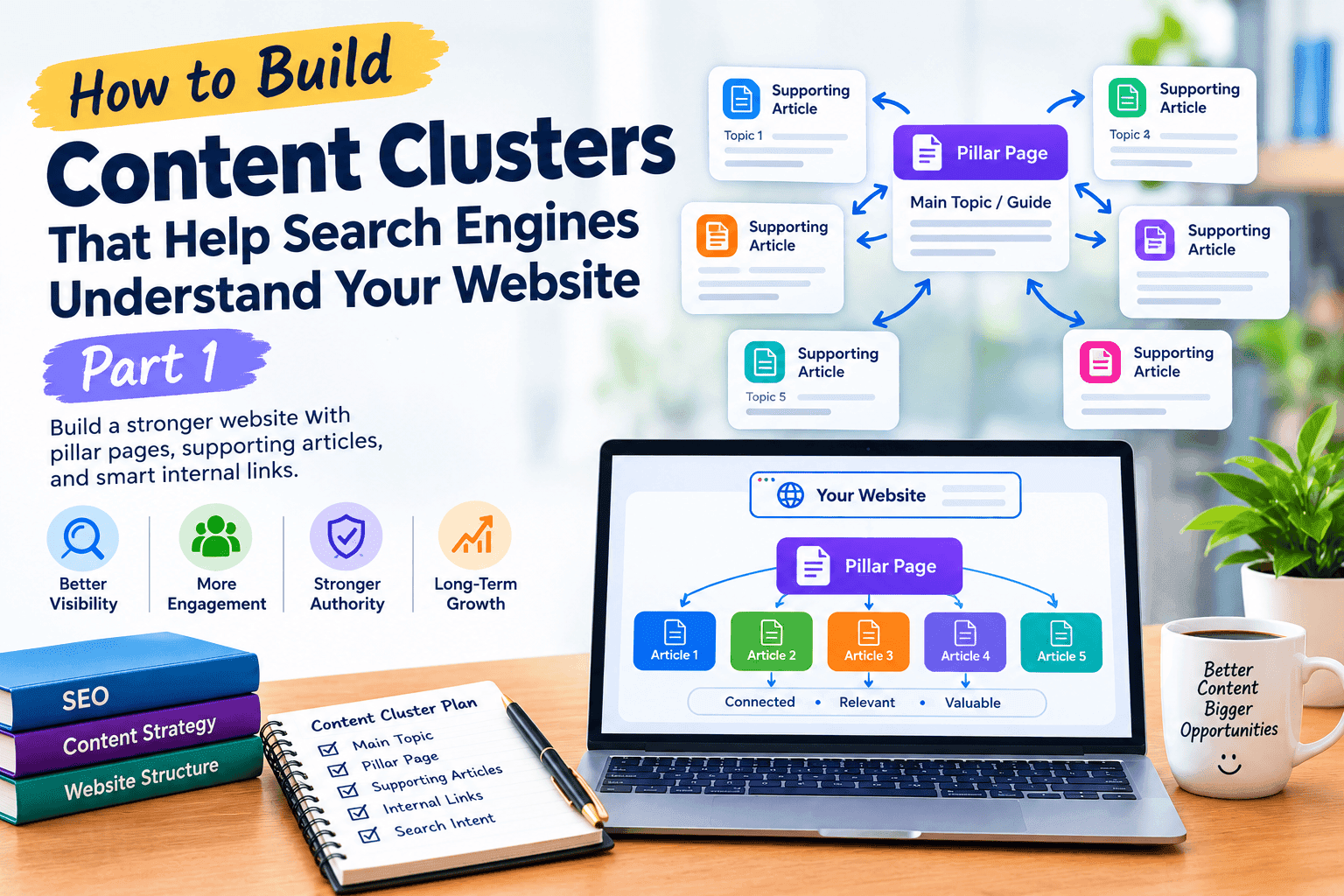
A content cluster is a group of related pages built around one main subject.
Usually, there are three basic parts:
A main topic
↓
A pillar page
↓
Supporting articles
For example, imagine your website focuses on SEO.
Your main topic could be:
SEO for Small Businesses
Your pillar page might cover the overall subject.
Then supporting articles could cover:
Keyword research
Local SEO
Technical SEO
Internal linking
Content optimization
Link building
SEO reporting
Website speed
Each supporting article goes deeper into one part of the bigger subject.
The result is much more organized than publishing random SEO articles whenever you find an interesting keyword.
Here’s a simple example
Suppose someone reads your article:
How to Build Content Clusters
While reading, they see that internal linking is an important part of the strategy.
You can naturally send them to another useful article about how internal links help connect related content.
The reader gets more information.
Your website gets a stronger connection between related pages.
And the content becomes easier to navigate.
That’s what a content cluster should do.
A cluster isn’t just a group of URLs
This is important.
You could publish 20 articles about SEO and call them a “content cluster.”
But if those articles don’t have a clear relationship, they are simply 20 articles.
A real cluster has a reason for every page to exist.
For example:
Pillar page:
Complete Guide to SEO for Small Businesses
Supporting page:
How to Find Keywords for a Small Business Website
Supporting page:
How to Improve Local SEO
Supporting page:
How to Build Internal Links
Supporting page:
How to Create Helpful SEO Content
Each page answers a different question.
Together, they cover the broader subject.
2. Why Random Blog Posts Don’t Build a Strong Website
Let’s say you publish these articles over six months:
10 Best Website Fonts
What Is SEO?
How to Create a Facebook Post
Best WordPress Plugins
How AI Is Changing Search
How to Choose a Logo
What Is Keyword Research?
How to Write a Blog
Best Hosting Companies
How to Compress Images
There are some useful topics here.
But what is the main subject of the website?
It’s difficult to tell.
This is what happens when a blog is built around individual keywords instead of a broader content strategy.
The problem with random publishing
When every article has a different purpose, you miss opportunities to build connections.
A visitor reads one article and leaves because there is no obvious next step.
Compare that with a website where the articles are organized around a clear subject.
A visitor reads:
What Is Keyword Research?
Then discovers:
How to Find Keywords for a Small Business Website
Then:
How to Use Keywords Naturally in Your Content
Then:
How to Measure Your SEO Results
Now the visitor is moving through a learning path.
That’s much more useful.
Your blog should answer the next question
This is one of the simplest ways to plan content.
After finishing an article, ask:
“What is the next question this reader is likely to ask?”
For example:
Article: What Is AI-Powered Search?
Next question:
How do I make my website ready for it?
Then you can naturally guide the reader to your article about making a website AI-friendly.
Then the reader may ask:
How do I know whether my website is actually appearing?
That leads naturally to how to check if your website appears in AI search results.
Now you have a connected journey.
3. Choose a Main Topic Before Choosing Keywords
This might sound strange in an SEO article, but don’t start with keywords.
Start with the subject.
Keywords come afterward.
Suppose you have a digital marketing website.
Instead of opening a keyword tool and collecting 100 phrases, first decide:
What do I want this section of my website to be genuinely useful for?
Maybe the answer is:
AI-powered search and website visibility.
Now break that subject into smaller areas.
Understanding the topic
What is AI-powered search?
How does it work?
How is it different from traditional search?
Website preparation
How can a website become easier to understand?
What content should be improved?
How should important pages be organized?
Content
How should articles answer questions?
How can you avoid keyword stuffing?
How can existing content be improved?
Measurement
How can you check visibility?
How can you track changes?
How can you identify content gaps?
Advanced topics
How can websites become useful sources?
How can businesses build topical coverage?
How should content clusters be organized?
Now you have a topic map.
Only after that should you start researching the exact phrases people use.
Why this approach is better
Because keyword tools don’t know your entire business strategy.
They can show you phrases.
They can’t decide which questions your website should genuinely answer.
That’s your job.
And this is where your existing blog can become much more powerful.
You’ve already created articles covering subjects such as how to get your website cited by AI search engines and how to track AI search visibility.
Instead of treating those as separate posts, you can treat them as pieces of a larger topic.
4. Create Your Pillar Page
Once you’ve chosen your main subject, the next step is to create a pillar page.
Think of a pillar page as the main doorway into your topic.
It doesn’t need to answer every tiny question.
Its job is to give the reader a useful overview and guide them toward more detailed resources.
Example
Imagine your main topic is:
AI Search for Business Websites
Your pillar page might explain:
What AI-powered search means
Why it matters to website owners
How content plays a role
How website structure fits in
How to monitor visibility
What common mistakes to avoid
Where readers can learn more
Then each section can point toward a more detailed article.
For example:
Want to know why your website may not be appearing? Read our guide on why AI search isn’t showing your website.
Or:
If you’re trying to measure changes over time, see our guide on how to track AI search visibility.
Now the pillar page becomes a navigation hub.
Don’t make the pillar page a giant keyword dump
A common mistake is trying to include every possible keyword in the pillar article.
That usually makes the writing worse.
Instead, imagine you’re explaining the subject to someone who knows very little about it.
What would they need to understand first?
What questions would naturally come next?
What detailed resources would help them continue?
Write the pillar page around those needs.
What Makes a Good Pillar Page?
A useful pillar page normally has four characteristics.
1. It covers the broad subject
The reader should leave with a clear understanding of the overall topic.
2. It links to deeper resources
When a subject deserves a separate explanation, send the reader there.
3. It has a logical structure
The reader should be able to scan the page and understand how the sections relate.
4. It doesn’t try to do everything
This is important.
A pillar page is an overview, not an excuse to write 15,000 words when 3,000–4,000 useful words would do the job.
Google’s current Search documentation emphasizes useful, accessible content and good site organization rather than a required word count or a special formula for creating long pages. Google Search documentation
A Simple Content Cluster Example
Here’s what your structure might eventually look like:
Main Topic: AI-Powered Search
↓
Pillar Page
How to Prepare Your Website for AI-Powered Search
↓
Supporting Article
Why AI Search Isn’t Showing Your Website
↓
Supporting Article
How to Check If Your Website Appears
↓
Supporting Article
How to Track AI Search Visibility
↓
Supporting Article
How to Get Your Website Cited
↓
Supporting Article
How to Optimize Content Without Keyword Stuffing
↓
Supporting Article
How to Build Topical Authority
↓
Supporting Article
How to Build Content Clusters
Now look at what you’ve created.
It’s no longer just a blog.
It’s a connected resource around a subject.
And because the articles answer different questions, you can link them naturally without repeating the same content everywhere.
One Important Warning
Don’t create dozens of pages simply because you can.
Google’s spam policies specifically warn against scaled content that is created primarily to manipulate Search rather than provide value to users. That applies regardless of whether the content was produced manually or with generative AI. Google’s spam policies
So your goal shouldn’t be:
“How many articles can I publish?”
A better question is:
“How many useful questions can I genuinely answer for my audience?”
That’s the difference between a content factory and a useful website.
What Comes Next?
You now have the foundation:
Choose the main topic → map the subject → create the pillar page → identify supporting questions.
But we’re still missing an important piece:
What should those supporting articles actually be?
That’s where we’ll go in Part 2.
We’ll look at how to find supporting topics, connect them with strategic internal links, match each article to search intent, and turn isolated posts into a proper content hub.
Part 2: How to Build a Strong Content Cluster
5. Find Supporting Topics That Actually Belong Together
Once you have your pillar page, the next step is deciding which supporting articles you need.
This is where many website owners make a mistake.
They start publishing anything that contains a keyword related to their main topic. After a few months, they have dozens of articles, but the website still feels disconnected.
A better approach is to ask:
What questions would someone naturally ask after reading my main article?
For example, imagine your main topic is:
WordPress Website Design
Your supporting topics could include:
How Much Does a WordPress Website Cost?
WordPress vs Custom Website Development
How to Choose a WordPress Theme
How to Improve WordPress Website Speed
Common WordPress Security Problems
How to Create an SEO-Friendly WordPress Website
How to Maintain a WordPress Website
These articles are not random. They support the same broader subject.
For an SEO website, you could create a cluster around AI and search visibility. For example, your existing articles about optimizing a website for AI-powered search and checking whether a website appears in AI search results can become supporting resources within a larger topic structure.
The important thing is relevance, not the number of articles.
You don’t need 50 posts just because a competitor has 50.
You need the right posts that answer the questions your audience actually has.
A simple way to find supporting topics
Start with your main topic and write down:
Beginner questions
How-to questions
Comparison questions
Problem-solving questions
Cost-related questions
Advanced questions
Common mistakes
Tools and resources
Real examples
Frequently asked questions
You can then turn the strongest questions into individual articles.
Google’s own Search resources emphasize creating useful content for people and maintaining a site that can be understood and crawled effectively.
6. Connect Your Articles With Strategic Internal Links
This is the part that turns a collection of articles into a content cluster.
Suppose you have these five articles:
Pillar page:
How to Improve Website SEO
Supporting articles:
How to Find SEO Keywords
How to Optimize Content
How to Build Internal Links
How to Improve Website Speed
How to Track SEO Performance
Don’t leave them sitting separately.
Connect them where the reader naturally needs more information.
For example:
Keyword research is the starting point of many SEO campaigns. Before optimizing your pages, learn [how to find the right SEO keywords].
Then, inside the keyword article, you might link back to the main SEO guide:
Once you’ve selected your keywords, you can follow our complete guide to [improving website SEO].
Now the pages support each other.
Don’t add links just for SEO
This distinction matters.
An internal link should help the reader move to the next useful piece of information.
If you’re discussing website speed and suddenly add three unrelated links about social media marketing, the links don’t improve the article. They simply make the page look cluttered.
Google also recommends descriptive anchor text so users can understand where a link will take them.
So instead of:
Click here
write:
Learn how to improve WordPress website speed
The second option gives the reader context before they click.
A practical internal-linking structure
Think of your cluster like this:
Pillar Page
↓
Supporting Article 1
↓
Supporting Article 2
↓
Supporting Article 3
But don’t stop there.
If Article 1 naturally relates to Article 3, link them too.
You might end up with something like:
Pillar → Article 1 → Article 3
Pillar → Article 2 → Article 4
Article 3 → Pillar
Article 4 → Article 2
This creates a connected network rather than a simple list of pages.
For example, if someone is learning about AI visibility, your article on tracking AI search visibility can naturally lead readers to your guide on getting a website cited by AI search engines.
The reader gets a logical next step instead of having to search your website manually.
7. Match Every Article With the Right Search Intent
Another important part of content clustering is search intent.
Two keywords can look similar but require completely different articles.
For example:
“WordPress website”
and
“How much does a WordPress website cost?”
The first could be informational, commercial, or navigational depending on the searcher.
The second clearly suggests that the person wants pricing information.
If you create the wrong type of content, even a well-written article may fail to satisfy the visitor.
Four common types of search intent
Informational
The person wants to learn something.
Examples:
What is WordPress?
What is internal linking?
What is technical SEO?
The best content is usually educational.
Commercial investigation
The person is researching options before making a decision.
Examples:
WordPress vs Shopify
Best SEO tools for small businesses
WordPress website design services
These pages can include comparisons, examples, features, pros and cons, and decision-making information.
Transactional
The person is ready to take action.
Examples:
Hire a WordPress developer
Buy an SEO service
WordPress website design pricing
These searches often deserve service or product pages rather than long educational articles.
Navigational
The person is looking for a specific website, company, or page.
For example:
Google Search Console
WordPress login
Canva
Trying to turn every keyword into a blog post is usually unnecessary.
Why intent matters inside a cluster
Imagine your website has a cluster around WordPress websites.
Your pillar page explains the complete process.
Then you have:
Educational article → What Is WordPress?
Comparison article → WordPress vs Custom Development
Problem article → Why Is My WordPress Website Slow?
Commercial article → WordPress Website Design Services
Pricing article → How Much Does a WordPress Website Cost?
Each page has a different job.
Together, they cover the topic much more naturally than five articles all trying to rank for exactly the same phrase.
This also helps prevent keyword cannibalization, where multiple pages on your own website end up targeting almost the same search need.
8. Build Content Hubs Instead of Isolated Blog Posts
A content cluster becomes much more powerful when you turn it into a content hub.
Think of a content hub as a small section of your website dedicated to one major subject.
For example, your website might have:
SEO Content Hub
Main guide:
Complete SEO Guide for Small Business Websites
Supporting resources:
Keyword Research
On-Page SEO
Technical SEO
Internal Linking
Content Optimization
Local SEO
SEO Performance Tracking
Then you can create another hub:
WordPress Content Hub
Main guide:
Complete WordPress Website Guide
Supporting resources:
WordPress Website Cost
WordPress Themes
WordPress Plugins
Website Speed
WordPress Security
WordPress Maintenance
SEO for WordPress
And another:
AI Search Content Hub
Main guide:
Complete Guide to AI Search Visibility
Supporting resources:
Why AI Search Isn’t Showing Your Website
How to Check AI Search Visibility
How to Track AI Search Visibility
How to Get Your Website Cited
How to Optimize a Website for AI-Powered Search
Your existing articles already give you the beginnings of this type of hub.
For example, your article explaining why AI search isn’t showing a website can connect naturally with your articles about checking visibility, tracking visibility, and getting citations.
The goal isn’t to force every article to link to every other article.
The goal is to make the important relationships obvious.
Think like a visitor
Imagine someone lands on your website for the first time.
They read one article and think:
“Okay, that answers my first question. What should I read next?”
Your content hub should make that next step easy.
You can use:
contextual internal links
related article sections
category pages
breadcrumb navigation
pillar pages
descriptive anchor text
Breadcrumbs can also help users understand where a page sits within your site’s hierarchy. Google describes breadcrumb trails as a way to indicate a page’s position in the site hierarchy and help users explore the site.
Don’t build a hub just for search engines
This is an important warning.
A content hub should make your website more useful, not simply create more URLs.
Publishing 30 thin articles that repeat the same information isn’t a content strategy.
Google’s spam policies specifically warn against creating content primarily to manipulate Search, including scaled content that provides little or no additional value.
A smaller cluster of genuinely useful articles can be more valuable to your visitors than a huge collection of repetitive posts.
The Simple Content Cluster Formula
You can remember the entire process like this:
One Main Topic
↓
One Strong Pillar Page
↓
Several Useful Supporting Articles
↓
Relevant Internal Links
↓
Different Search Intents
↓
One Connected Content Hub
That is the basic structure.
In Part 3, we’ll put this into practice with a realistic example of turning 10 separate articles into one content cluster, then cover the biggest mistakes to avoid, how to maintain the cluster over time, and a complete content-cluster checklist.
Part 3: Practical Example, Common Mistakes & Complete Checklist
9. Real Example: Turning 10 Articles Into One Content Cluster
Let’s make this practical.
Imagine you run a website that offers SEO services for small businesses.
You already have 10 separate articles:
What Is SEO?
How to Find SEO Keywords
How to Optimize a Website
What Is Technical SEO?
How to Improve Website Speed
How to Build Internal Links
How to Create SEO-Friendly Content
How to Track SEO Performance
Common SEO Mistakes
How Long Does SEO Take?
Individually, these are useful articles.
But if they’re published without a clear structure, your website may feel like a collection of unrelated blog posts.
Now let’s turn them into a content cluster.
Step 1: Choose the pillar topic
Create one comprehensive page:
The Complete SEO Guide for Small Businesses
This becomes the central resource.
It introduces the major parts of SEO and links to the more detailed articles.
Step 2: Group the supporting articles
You could organize them like this:
SEO Basics
What Is SEO?
How Long Does SEO Take?
Keyword Research
How to Find SEO Keywords
On-Page SEO
How to Optimize a Website
How to Create SEO-Friendly Content
Technical SEO
What Is Technical SEO?
How to Improve Website Speed
Internal Linking
How to Build Internal Links
Measurement
How to Track SEO Performance
Problems
Common SEO Mistakes
Now the structure makes much more sense.
Step 3: Connect the pages
The pillar page links to the supporting articles.
But the supporting articles also link back to the pillar page when appropriate.
For example:
If you’re new to SEO, start with our complete SEO guide before moving into keyword research and technical optimization.
Then the keyword research article can naturally point readers toward the technical SEO article when discussing website optimization.
The result is a connected group of resources rather than ten isolated URLs.
You can use the same approach on your own website
Your existing AI-search articles already cover several related questions.
For example, a visitor could move through:
Why AI Search Isn’t Showing Your Website
↓
How to Check If Your Website Appears in AI Search Results
↓
How to Track AI Search Visibility
↓
How to Get Your Website Cited by AI Search Engines
↓
How to Optimize Your Website for AI-Powered Search
Each article answers a different question.
That makes them natural candidates for a connected content hub.
The key is not to force the links. Add them where they genuinely help the reader continue learning.
10. Common Content Cluster Mistakes
Content clusters sound simple, but there are several ways to get them wrong.
Mistake 1: Creating articles just to increase the number of posts
More content isn’t automatically better.
If you already have ten excellent articles about a topic, don’t create another five just because you think a bigger cluster must be better.
Ask whether the new article answers a different and useful question.
If it doesn’t, you may be better off improving an existing article.
Mistake 2: Targeting the same search intent repeatedly
Suppose you already have:
How to Improve WordPress Website Speed
Then you create:
Ways to Make WordPress Websites Faster
Then:
How to Speed Up Your WordPress Site
If all three pages answer essentially the same question, you’re not building a stronger cluster.
You’re creating unnecessary overlap.
Instead, you could expand the original article or create a genuinely different supporting topic, such as:
How to Test WordPress Website Speed
That gives the cluster a new purpose.
Mistake 3: Adding internal links everywhere
Internal linking is useful.
But every paragraph doesn’t need a link.
A page filled with blue links becomes difficult to read, especially on mobile.
Use links when the reader is likely to benefit from additional information.
A good question to ask is:
“Would I want this link if I were the person reading this sentence?”
If the answer is no, don’t add it.
Mistake 4: Using the same anchor text repeatedly
If every internal link says exactly the same thing, the page can feel unnatural.
Instead of repeatedly writing:
SEO guide
you can naturally use phrases such as:
complete SEO guide
learn the basics of SEO
our guide to website optimization
SEO strategy for small businesses
The anchor should accurately describe the destination.
Mistake 5: Making the pillar page unnecessarily huge
A pillar page doesn’t need to be 10,000 words simply because it’s called a “pillar.”
Its job is to give readers a useful overview and direct them toward deeper resources.
If a topic requires 15 detailed explanations, it can be better to explain each one briefly on the pillar page and link to dedicated articles.
This makes the site easier to navigate.
Mistake 6: Forgetting older articles
Many website owners publish a new article and forget about everything they published six months ago.
That’s a missed opportunity.
When you publish a new supporting article, look at your older content.
Ask:
“Which existing articles should link to this new article?”
This creates a habit of continuously improving your content network.
11. How to Maintain and Expand Your Content Cluster
A content cluster isn’t something you build once and forget.
Your website changes.
New questions appear.
Old information becomes outdated.
Some articles perform well while others receive almost no traffic.
That’s why you should review your clusters periodically.
Step 1: Check your existing articles
Look for:
outdated information
broken links
missing internal links
overlapping topics
weak introductions
unanswered questions
old screenshots or examples
articles that haven’t been updated for a long time
Don’t automatically delete an old article.
First determine whether it can be improved.
Step 2: Find gaps
Imagine your main topic has articles about:
what SEO is
keyword research
on-page SEO
technical SEO
But nothing explains how to measure results.
That’s a content gap.
You could create:
How to Measure SEO Performance
Now the cluster covers another important part of the subject.
This is one of the best reasons to build clusters: they make missing information easier to see.
Step 3: Strengthen internal connections
Every time you add a useful article, revisit related older pages.
Suppose you publish:
How to Build Internal Links
You could then update relevant older articles so they naturally point toward it.
At the same time, the new article can link back to important pages in the cluster.
Over time, your website becomes increasingly interconnected.
Step 4: Improve your strongest articles
Don’t spend all your time writing new posts.
Sometimes the best SEO work is improving an article that already gets impressions or visitors.
You might:
make the introduction clearer
answer important questions earlier
add examples
improve headings
update outdated information
add useful internal links
remove repetitive sections
improve readability
This is especially useful when an article already has some visibility but isn’t performing as well as you’d like.
Step 5: Add new content only when there is a reason
Before creating a new article, ask:
What question does this article answer that my existing content doesn’t?
If you have a good answer, create it.
If you don’t, improve an existing article instead.
This simple rule can prevent your blog from becoming bloated.
12. Complete Content Cluster Checklist + FAQs
Before considering a content cluster complete, run through this checklist.
Content Cluster Checklist
Topic
Have I chosen one clear main topic?
Does the topic matter to my target audience?
Have I identified the major subtopics?
Pillar Page
Do I have one strong central resource?
Does it give a useful overview?
Does it link to the deeper supporting articles?
Supporting Content
Does each article answer a different question?
Does every article have a clear purpose?
Have I avoided unnecessary topic repetition?
Internal Linking
Does the pillar page link to important supporting content?
Do supporting articles link back when relevant?
Are the links useful to readers?
Are the anchor texts descriptive and natural?
Search Intent
Does each page match the reason someone searched for it?
Have I separated informational and commercial topics where appropriate?
Am I avoiding multiple pages targeting the same search intent?
Maintenance
Have I checked old articles for outdated information?
Have I fixed broken internal links?
Have I looked for content gaps?
Am I improving existing content instead of publishing unnecessarily?
Frequently Asked Questions
The main purpose is to organize related content around a central topic and make the relationships between those pages clear and useful for visitors.
There is no fixed number.
A small cluster might contain five strong articles, while a broad subject might eventually need dozens. Quality and relevance matter more than reaching a particular number.
No.
Only add links where there is a genuine relationship or where the additional article helps the reader understand the subject better.
No.
One article can naturally rank for many related searches. Creating a separate page for every small keyword variation can produce repetitive content.
Focus on covering different questions and search intents.
Absolutely.
In fact, this is one of the easiest ways to build a cluster without starting from zero.
Review your existing posts, identify which ones belong to the same subject, then improve their structure and internal linking.
They can be.
For example, an SEO service page could be connected to educational articles about keyword research, technical SEO, content optimization, and SEO reporting.
The blog content answers informational questions while the service page serves visitors who are interested in hiring a provider.
A well-organized website can make relationships between related information clearer for both users and search systems. But a content cluster is not a special ranking trick or a guarantee of visibility.
The same basic principle applies: create useful, original information and organize it so people can easily find related resources.
Final Thoughts
A content cluster isn’t complicated technology.
It’s really a way of thinking about your website.
Instead of asking:
“What should I publish next?”
start asking:
“What important question about my main topic have I not answered yet?”
That small change can completely improve your content strategy.
Choose a main subject.
Build a useful pillar page.
Create supporting articles that answer different questions.
Connect them with natural internal links.
Match each page to its search intent.
Then keep improving the cluster as your website grows.
You don’t need hundreds of articles.
You need a website where the important information is connected, useful, and easy to explore.
That’s what turns a collection of blog posts into a real content resource.